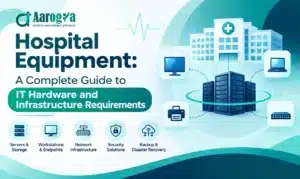
Hospital Equipment: A Complete Guide to IT Hardware and Infrastructure Requirements
Table of Contents
ToggleIntroduction
Why the Right Hospital Equipment Matters
Hospital equipment is not limited to medical devices and diagnostic machines. It also includes the IT hardware and infrastructure that help hospitals manage patient information, consultations, billing, pharmacy operations, laboratory records and other everyday activities.
Think about a hospital’s daily operations. Patients arrive at reception for registration, doctors access medical records during consultations, billing teams generate invoices, pharmacists manage medicine transactions, and laboratory staff process investigation requests. Every department depends on the right combination of equipment, software and network connectivity to complete these activities.
But what exactly does a hospital need to establish a reliable digital infrastructure?
Is a desktop computer enough? Which printer should be installed at the billing counter? Does the laboratory require a separate barcode printer? Is a local server compulsory for hospital management software? How should the hospital plan its network and power backup?
These are important questions to answer before purchasing hospital equipment.
The requirements also vary according to the hospital’s size, departments, number of users and digital workflows. A well-planned infrastructure should therefore consider both present requirements and future expansion.
This is where a connected Hospital Management Information System (HMIS) becomes important. With Aarogya Hospital Management Software, hospitals can bring activities such as patient registration, OPD, IPD, pharmacy, laboratory, billing and TPA management into a coordinated digital environment. The hardware supports these workflows, while the software helps departments work with connected information.
Essential Hospital Equipment: Department-Wise Requirements
Hospital equipment requirements vary according to the size of the facility, number of departments, patient volume and the software being implemented.
A small hospital may need only a few shared workstations, while a multi-specialty hospital may require dedicated systems across several departments.
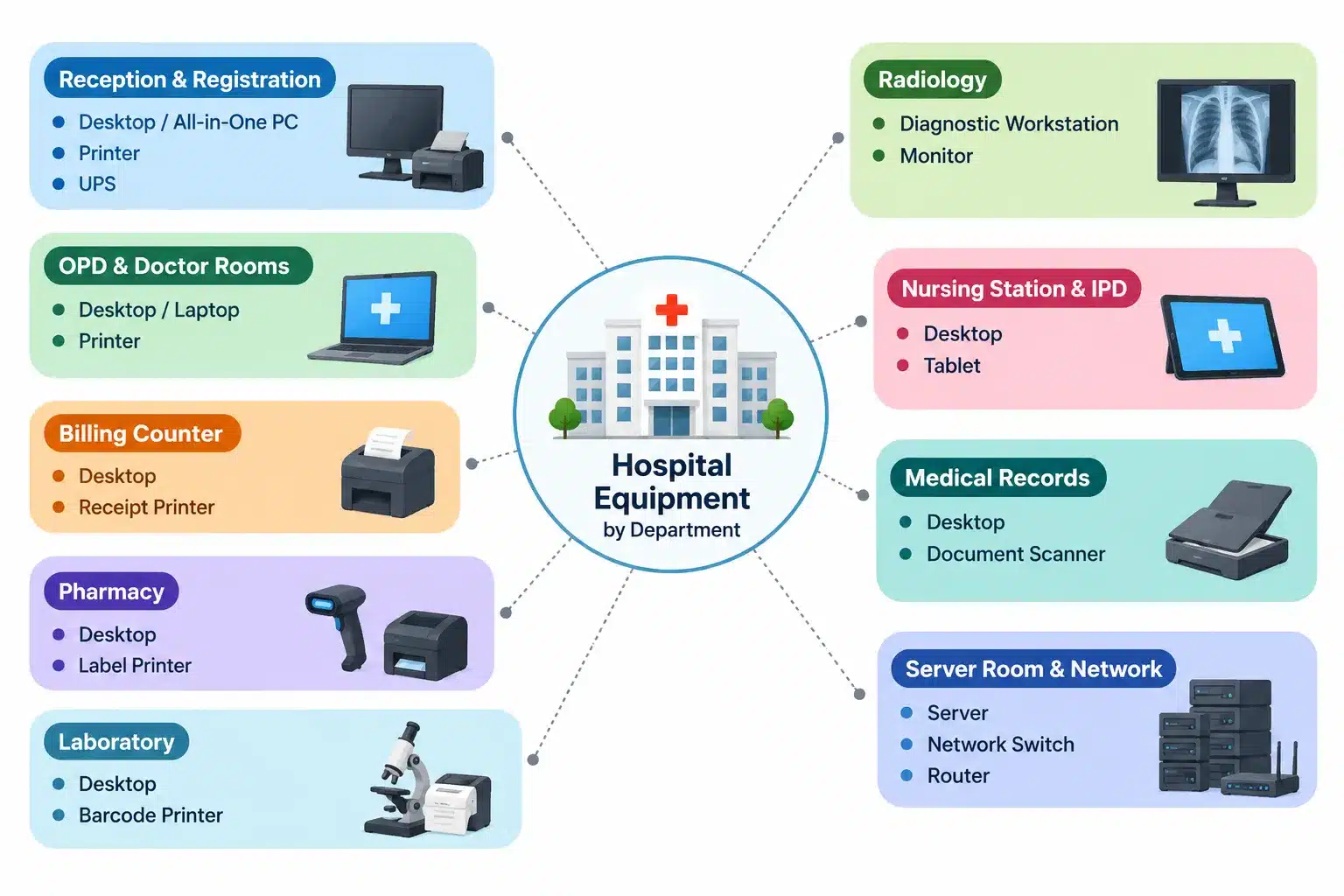
The following table provides a practical overview of commonly required hardware.
| Department | Essential Equipment | Additional or Optional Equipment |
|---|---|---|
| Reception and Registration | Desktop or All-in-One PC, A4 laser printer, UPS | QR/barcode scanner, label printer, document scanner |
| OPD and Doctor Rooms | Desktop or laptop | Printer, webcam, headset, tablet |
| Billing Counter | Desktop, thermal receipt printer | Barcode scanner, POS machine, cash drawer |
| Pharmacy | Desktop, thermal receipt printer | Barcode scanner, label printer, A4 printer |
| Store and Inventory | Desktop | Handheld barcode scanner, label printer, weighing scale |
| Laboratory | Desktop, barcode label printer | Barcode scanner, A4 printer, UPS |
| Nursing Station and IPD | Desktop | Tablet, wristband printer, A4 printer |
| Medical Records Department | Desktop | ADF document scanner |
| Radiology | Diagnostic workstation and monitor, as required | PACS storage and related infrastructure |
| Server Room and Network | Network switch, router/firewall, cabling, online UPS | Wi-Fi access points, network rack, backup storage |
Reception and Patient Registration
The reception area is usually the first point of interaction for patients. It handles registrations, appointment-related activities, patient details and other administrative tasks.
A suitable desktop computer, printer and UPS form the basic setup. Barcode or QR scanners and document scanners can be added depending on the hospital’s registration process.
When registration equipment is planned properly, staff can work more efficiently while maintaining patient information in the hospital’s digital system.
OPD and Doctor Consultation Rooms
Doctors and OPD staff need reliable systems to access patient information and manage consultation activities.
A desktop or laptop with sufficient memory and SSD storage is a practical starting point. Printers may be shared between nearby consultation rooms depending on the hospital’s workflow.
Tablets and webcams can be considered where the hospital has a defined requirement for mobile access or teleconsultation.
Billing and Pharmacy
Billing counters and pharmacies handle frequent transactions, making reliable computers and receipt printers important.
Thermal receipt printers are commonly used for billing counters. Pharmacy operations may also benefit from barcode scanners and label printers, depending on the medicine identification and labelling process.
The selected devices should be checked for compatibility with the hospital’s billing and pharmacy workflows.
Laboratory and Diagnostic Departments
Laboratories depend on computers, barcode label printers and suitable printing facilities for investigation-related activities.
Where diagnostic analysers are connected to the hospital system, their communication interfaces and software compatibility should be assessed separately by the technical and biomedical teams.
Radiology departments may also require diagnostic workstations, suitable displays and PACS storage depending on the imaging equipment and image-retention requirements.
Nursing Stations, IPD and Medical Records
Nursing stations require computers to access patient information and maintain relevant nursing and medical observation records.
Depending on the hospital’s workflow, tablets, bedside devices and wristband printers may also be considered.
The Medical Records Department can benefit from document scanners, particularly where historical patient files and supporting documents need to be digitized.
Hospital IT Infrastructure: The Foundation of Digital Operations
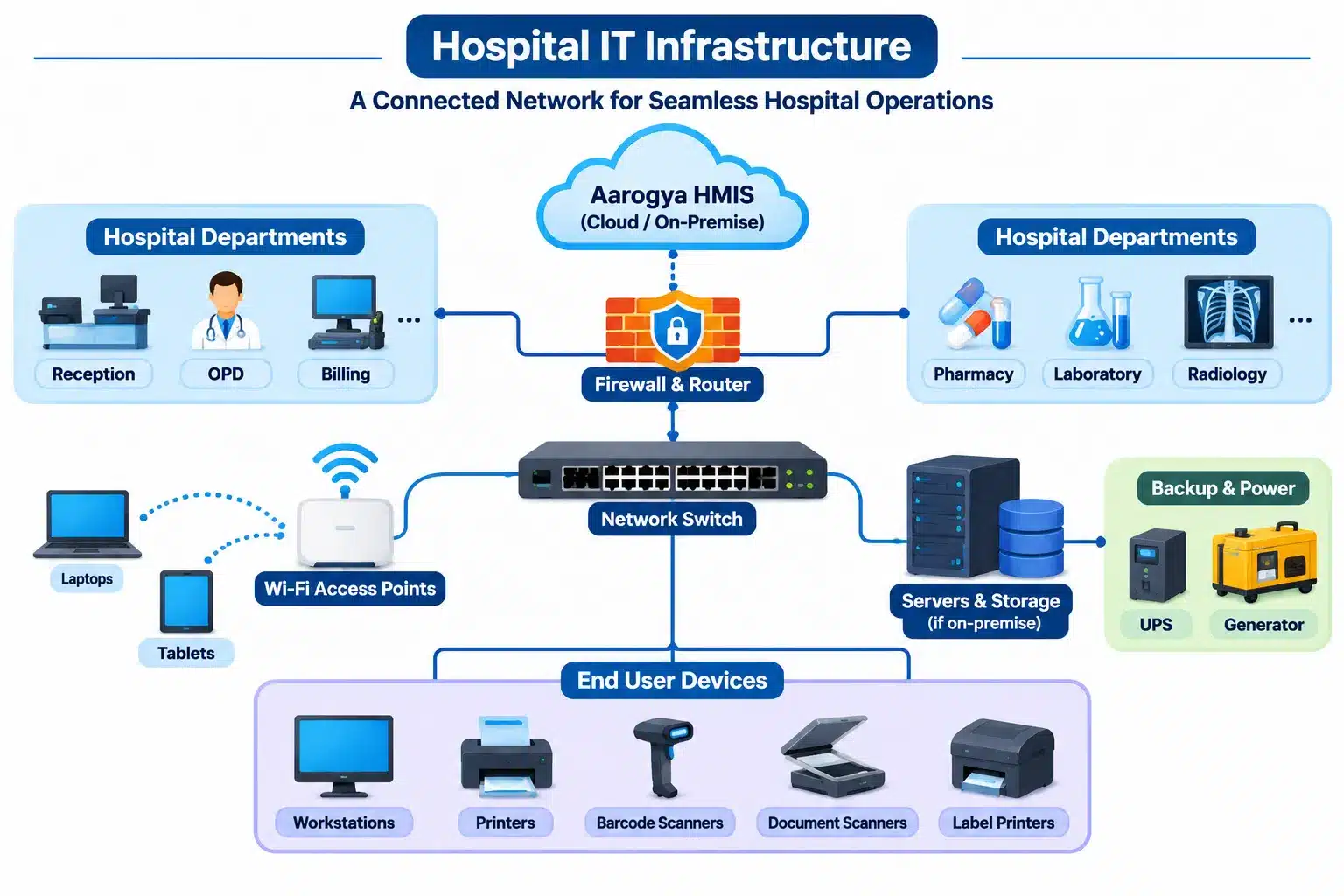
Hospital equipment planning should not stop with individual computers and printers. The network, power supply and data infrastructure are equally important.
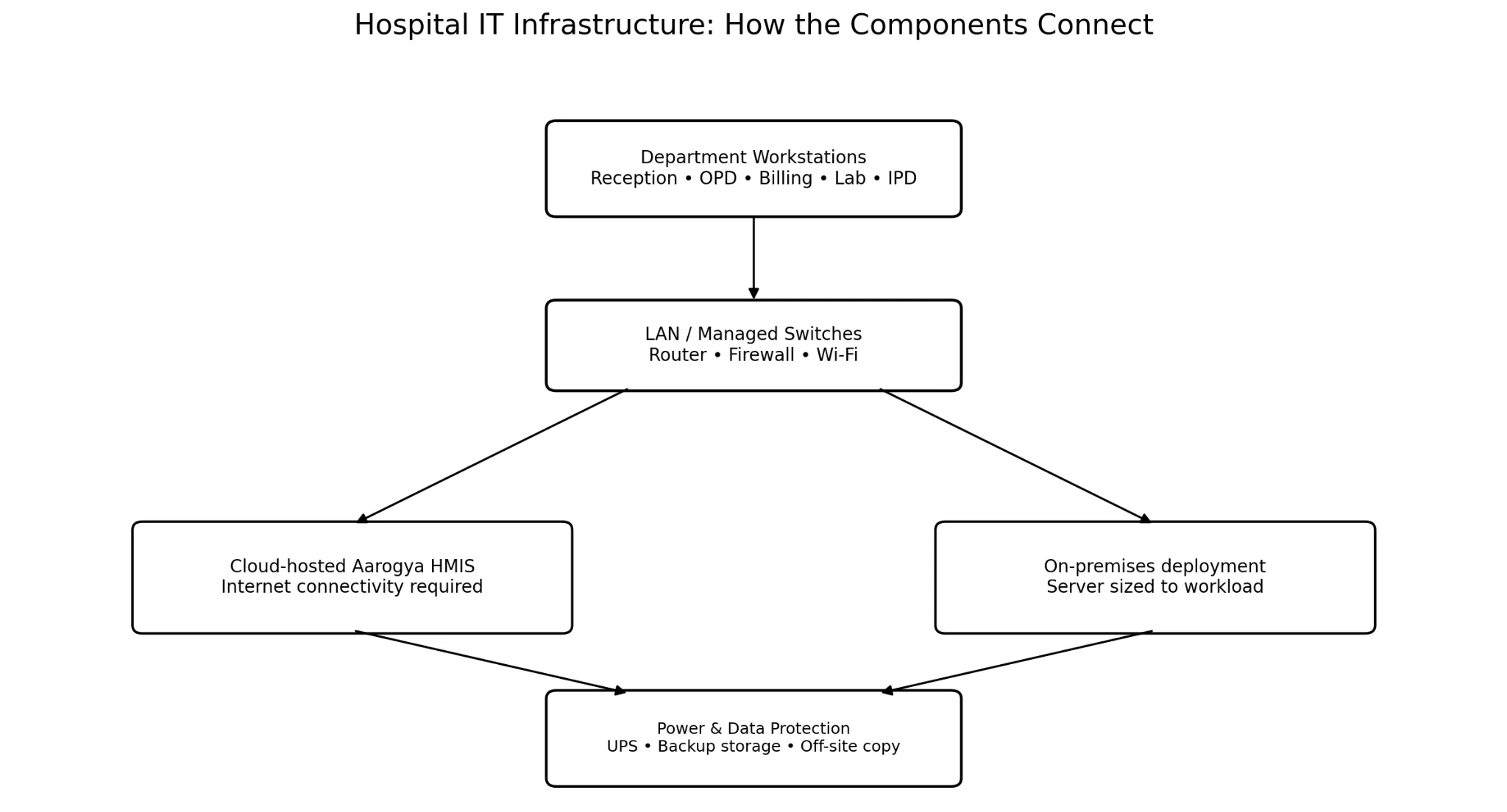
A hospital may have suitable hardware in every department, but if the network is unreliable, staff may still experience delays while accessing the HMIS.
Network Infrastructure
A dependable hospital network connects different departments and enables authorized users to access the required digital systems.
Common infrastructure components include:
- Managed Gigabit network switches.
- Business-grade router and firewall.
- Wi-Fi access points.
- Cat6 network cabling.
- Network racks and patch panels.
- Separate staff and guest network arrangements, where required.
Network capacity should be planned according to the number of users, connected devices, departments and expected data traffic.
Server and Data Storage
Server requirements depend on the software deployment model.
For a cloud-hosted Aarogya implementation, a local application or database server may not be required. Hospitals should confirm the deployment arrangement before purchasing server hardware.
Where an on-premises setup is planned, server specifications should be determined according to the application, database, user load and storage requirements.
Hospitals should also consider backup storage, data protection and recovery arrangements.
Power Backup
Uninterrupted power is important for maintaining access to hospital systems.
UPS devices can support computers, network equipment and other selected devices during short power interruptions. Larger infrastructure may require an online UPS, while generator backup can support wider hospital operations.
The required UPS capacity and runtime should be calculated based on the actual connected load.
How to Choose the Right Hospital Equipment for HMIS Implementation
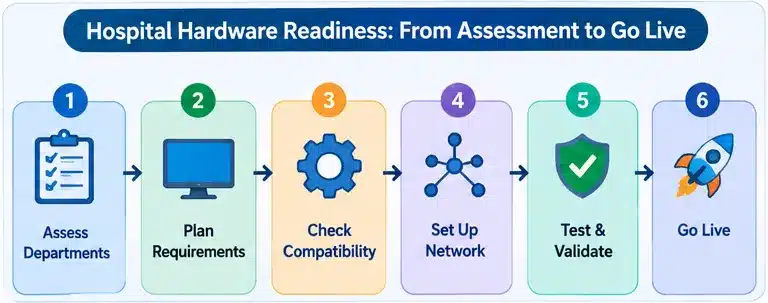
Choosing hospital equipment becomes easier when the process follows a clear implementation plan. Instead of purchasing devices department by department without coordination, hospitals should assess their requirements before finalizing the hardware.
Step 1: Conduct a Department-Wise Assessment
Start by identifying the departments where the HMIS will be used.
List the number of registration counters, doctor rooms, billing stations, nursing stations, laboratories and other operational areas.
This gives the hospital a clear picture of where computers and supporting devices are required.
Step 2: Prepare the Hardware Requirement List
Create a department-wise list of equipment, including:
- Equipment name and purpose.
- Recommended specifications.
- Required quantity.
- Available quantity.
- Additional quantity or shortfall.
This assessment helps hospitals avoid unnecessary purchases and identify infrastructure gaps before implementation.
Step 3: Confirm Software and Device Compatibility
Before purchasing printers, barcode scanners, laboratory interfaces or other peripherals, confirm whether the selected models, drivers and interfaces are supported by the HMIS workflow.
This is particularly important for diagnostic equipment, barcode-based activities and specialized printing requirements.
Step 4: Plan Network and Power Requirements
Check network connectivity across all departments and identify areas where additional cabling or Wi-Fi access points may be required.
Assess UPS capacity and other backup arrangements according to the devices that need continuous power.
Step 5: Install, Configure and Test
Once the equipment is available, install the required devices and test them within their respective workflows.
For example, test registration printing at the reception counter, receipt printing at billing, label printing in the laboratory and connectivity for supported diagnostic devices.
Step 6: Complete Department-Wise Readiness
Before going live, verify that the required workstations, printers, network access and supporting devices are available in each department.
This final assessment helps the implementation team identify unresolved issues before the system becomes part of daily hospital operations.
Hardware Compatibility: What to Consider Before Purchase
Hardware compatibility is an important part of hospital equipment planning. A device may meet the required technical specifications but still may not work correctly with the hospital’s software or operational process.
Before finalizing purchases, hospitals should focus on a few practical considerations:
| Equipment | Compatibility Consideration |
|---|---|
| Desktop and Laptop | Operating system, browser and performance requirements |
| Barcode Scanner | Supported barcode format and connection interface |
| Receipt Printer | Supported printer model, driver and interface |
| Label Printer | Label dimensions, template and printing format |
| Document Scanner | Scanning format, resolution and document-feeding requirements |
| Laboratory Analyser | Communication interface and integration feasibility |
| Biometric Device | Supported model, SDK/RD service and intended workflow |
| Tablet or Bedside Device | Browser compatibility, network coverage and device management |
| Network Equipment | Port capacity, bandwidth and security requirements |
For diagnostic analysers, PACS systems and other specialized clinical equipment, the hospital’s biomedical and IT teams should separately assess the technical requirements.
It is always advisable to confirm supported models and interfaces with the software implementation team before placing bulk orders.
How Aarogya HMIS Fits into Hospital Digital Infrastructure
Hospital equipment provides the physical infrastructure, while HMIS connects the information and workflows that departments use every day.
Aarogya HMIS by Dataman is designed to support hospital operations through a range of connected functional areas.
For example, when a patient arrives at the hospital, the reception team can use the patient registration functionality to record patient details. Appointment scheduling and OPD management support the outpatient workflow, including OPD appointments, registrations and charges.
During the patient’s hospital journey, the system also supports IPD management, ward and bed configuration, admission and bed allocation, medical observations and nursing notes.
Laboratory and radiology workflows support investigation requests and reporting activities. Pharmacy and inventory functions support medicine and stock-related operations.
The hospital’s hardware infrastructure makes these digital workflows accessible to the relevant teams.
Connecting Hardware with Everyday Hospital Workflows
| Hospital Activity | Hardware Support | Aarogya HMIS Functionality |
|---|---|---|
| Patient Registration | Computer, printer and optional scanner | Patient Registration |
| Appointment and OPD | Computer or laptop | Appointment Scheduling and OPD Management |
| Billing | Computer and thermal receipt printer | Billing-related workflows |
| Laboratory | Computer and barcode label printer | Investigation requests, sample collection and reports |
| Radiology | Workstation and relevant imaging infrastructure | Radiology Lab Management |
| Pharmacy | Computer and receipt printer | Pharmacy Software |
| Inventory | Computer and barcode devices, where required | Inventory Management |
| IPD and Nursing | Nursing station computer | IPD Management, Medical Observation and Nursing Notes |
Aarogya also supports WhatsApp integration, TPA management, finance and accounting management, and HMIS reporting.
The exact hardware configuration depends on the hospital’s selected modules, deployment model, department requirements and integration scope.
Hospitals planning a digital transformation can learn more about Aarogya Hospital Management Software and its approach to connected hospital operations.
Read Also: If you are evaluating how a hospital-wide software platform connects different departments, read our guide to Hospital Management Software in India.
For hospitals looking to understand the financial side of digital operations, our article on 5 Ways Hospital Billing Software Can Save You Money offers additional insights.
Government Guidelines and Digital Healthcare Standards
Hospital equipment and IT infrastructure planning should also consider the broader requirements of digital healthcare, electronic health records and quality-focused hospital operations.
India has published several guidelines and standards that hospitals can refer to while planning their digital infrastructure.
National Health Authority (NHA)
The National Health Authority plays an important role in the implementation of the Ayushman Bharat Digital Mission and the development of India’s digital healthcare ecosystem.
Hospitals planning digital health infrastructure can refer to the official NHA information and guidelines.
Ministry of Health and Family Welfare (MoHFW)
The Ministry of Health and Family Welfare has published the Electronic Health Record (EHR) Standards for India. These standards provide guidance on electronic health information and interoperability.
Hospitals can refer to the official EHR Standards for India document.
National Accreditation Board for Hospitals and Healthcare Providers (NABH)
NABH provides quality and accreditation-related resources for healthcare organizations. Hospitals planning technology-enabled processes can also refer to its digital healthcare resources.
Explore the official NABH Digital Toolkit.
These resources should be considered alongside the hospital’s own operational, clinical, technical and regulatory requirements. Hardware selection alone does not establish compliance with any particular standard or accreditation requirement.
Conclusion
Planning the right hospital equipment is an important step towards building a reliable digital hospital environment. From reception computers and billing printers to laboratory devices, network infrastructure and power backup, every component should support the way the hospital operates.
The best approach is to assess department-wise requirements, confirm device compatibility, plan connectivity and power, and test the equipment before implementation.
When the hardware infrastructure is planned alongside the HMIS, hospital teams can work within a more connected and organized digital environment.
Aarogya Hospital Management Software by Dataman supports this approach by bringing patient registration, appointment scheduling, OPD, IPD, laboratory, radiology, pharmacy, inventory and other hospital functions into a connected operational platform.
Planning your hospital’s HMIS implementation? Connect with the Aarogya team to discuss your hospital’s requirements and understand the hardware and software considerations for your implementation.
Frequently Asked Questions
1. What equipment is required for hospital HMIS implementation?
Common requirements include desktop computers, printers, barcode scanners, network switches, routers, UPS devices and other department-specific peripherals. The final list depends on the hospital’s size, workflows and selected HMIS modules.
2. Does Aarogya HMIS support appointment scheduling?
3. Does Aarogya support patient registration and OPD management?
Yes. Aarogya includes Patient Registration and OPD Management, including OPD appointments, registrations and charges.
4. Can Aarogya support laboratory and radiology workflows?
Yes. The shared Aarogya feature list includes Pathology Software and Radiology Lab Management, covering investigation requests, sample collection and report generation. Specific diagnostic equipment integration should be confirmed separately.
5. Does Aarogya include pharmacy and inventory management?
Yes. Aarogya includes Pharmacy Software and Inventory Management, with functions such as purchase processes, goods receipts, stock transfers, stock ledgers and stock-related reports.
6. Does every hospital need an on-premises server for Aarogya?
Not necessarily. Server requirements depend on the deployment model. Cloud-hosted implementations may not require a local application or database server. Confirm the proposed deployment architecture before purchasing server hardware.
Categories
Recent Posts
-
 27 Nov 2026Hospital Equipment: A Complete Guide to IT Hardware and Infrastructure Requirements
-
03 Nov 2026What is NHCX, Full Form of NHCX Integration and Benefits for Hospitals
-
31 Oct 2026Best PACS Software for Hospitals: PACS Integration with RIS and HMIS
-
13 Oct 2026TPA Claim Approvals Made Easy with Hospital Billing Software
-
28 Sep 2026What is NABH? Full Form, Accreditation, Certification & NABH-Certified HMS Explained
-
08 Sep 2026EMR Software: What It Is, How It Works, Key Benefits, Features, and the Future of Digital Healthcare
-
16 Aug 2026What Is a Kiosk Machine? Smart Kiosks in Healthcare | Aarogya
-
27 Jul 2026Patient Drug Registry, Unified Health Interface (UHI) & NHCX FHIR: How Aarogya HMIS Can Power India's Next Generation Digital Healthcare
-
29 Jun 2026Best HMIS Software in Kolkata 2026: How Digital Healthcare Is Transforming Patient Care Across the City
-
25 Jun 2026Best Bank Reconciliation Software | Automated Bank Reconciliation with Aarogya