Best PACS Software for Hospitals: PACS Integration with RIS and HMIS

Table of Contents
Toggle1. What Is PACS?
PACS stands for Picture Archiving and Communication System. It is a digital system used by hospitals and diagnostic centres to store, manage, retrieve, transmit and view medical images such as X-rays, CT scans, MRI scans, ultrasound studies and other diagnostic imaging.
Instead of depending on physical films or disconnected image-storage systems, PACS allows medical images to be managed digitally and accessed through appropriate workstations or viewers.
Modern PACS is more than an image archive. It forms part of the wider digital radiology environment, connecting imaging modalities, radiologists, reporting systems, RIS and hospital information systems.
Research on PACS describes its core functions around digital image acquisition, archiving, transmission and display. The development of interoperability standards such as DICOM has also played an important role in connecting imaging devices and PACS environments.
For hospitals searching for the best PACS software, this distinction matters. The best solution is not simply the one that stores the most images. It should fit into the hospital’s existing technology environment and support reliable communication between imaging equipment, radiology teams and clinical systems.That is where PACS integration becomes important.
Hospitals evaluating PACS software should consider DICOM support, RIS integration, HMIS or HIS connectivity, reporting, image viewing, security, scalability and the ability to access relevant information without unnecessary duplicate data entry.
For hospitals looking for a connected radiology environment, Aarogya HMIS hospital management workflows with an integrated RIS approach. Aarogya RIS is designed to connect registration, billing, diagnostics, PACS and EMR workflows, with HL7 and DICOM support and connectivity with NEORAD PACS. Explore Aarogya RIS.

2. Why Do Hospitals Need PACS Software?
Medical imaging generates large volumes of data. A hospital may have multiple imaging modalities, radiologists, departments and locations that need access to the same examination.
Without an appropriate digital imaging system, managing these studies can become difficult as imaging volume increases.
PACS provides a structured environment for storing and retrieving medical images. It can also allow authorised users in different locations to access the same studies, depending on the hospital’s architecture and access policies.
This becomes particularly useful when radiology services operate across multiple departments or hospital locations.
Modern PACS environments can also support image manipulation, comparison with previous studies, reporting workflows and access outside the radiology department. The evolution of PACS has increasingly moved toward enterprise-wide image management rather than isolated radiology archives.
A good PACS therefore needs to work as part of a larger ecosystem.
The question is no longer simply:
“Where will we store our medical images?”
It is:
“How will our imaging data connect with the rest of the hospital?”
3. What Makes the Best PACS Software?
There is no single PACS product that is automatically the best choice for every hospital.
The best PACS software is the one that meets the hospital’s clinical, technical and operational requirements while integrating effectively with existing systems.
Important capabilities include
- DICOM compatibility for imaging communication and management
- RIS integration for radiology workflows
- HMIS/HIS integration for hospital-wide patient and clinical information
- PACS viewer capabilities for radiologists and clinicians
- Secure image storage and retrieval
- Scalability as imaging volume grows
- Reporting integration
- Support for multiple modalities
- Reliable performance across hospital networks
- Migration and interoperability options
The evaluation should also consider implementation support, user training, technical maintenance and future expansion.
PACS implementation literature highlights integration with existing HIS, networking, training, maintenance and scalability as important practical considerations.
4. PACS vs RIS vs HMIS
PACS, RIS and HMIS are connected technologies, but they serve different purposes.
| System | Primary Purpose | Typical Information |
|---|---|---|
| PACS | Medical image management | Images, imaging studies, image metadata |
| RIS | Radiology workflow management | Radiology orders, scheduling, reporting, status |
| HMIS/HIS | Hospital-wide management | Patient, clinical, billing and operational information |
A PACS primarily manages medical imaging.
An RIS (Radiology Information System) manages radiology-related workflows and information.
An HMIS (Hospital Management Information System) manages a much wider range of hospital activities, including registration, clinical workflows, billing, pharmacy, laboratory, appointments and other operational processes.
When these systems communicate properly, radiology becomes part of the hospital’s overall digital workflow rather than functioning as a separate department.

5. What Is PACS Integration?
PACS integration means connecting PACS with other healthcare systems and imaging technologies so that relevant information can move between them in a structured manner.
A PACS may need to communicate with imaging modalities, RIS, HMIS/HIS, EMR systems, reporting applications and other clinical technologies.
For example, a radiology order generated within a hospital system may need to reach the RIS. Patient and study information may then be available to an imaging modality, while the resulting images are transferred to PACS.
Once reporting is completed, the report or access information can be made available to the appropriate clinical system.
The exact architecture differs between hospitals, but the objective remains similar: reduce unnecessary manual work and maintain consistency of patient and study information.
Research into HIS/RIS/PACS integration has highlighted the importance of connecting digital images with clinical information systems to support workflow, patient throughput and information access.
6. DICOM and HL7 in PACS Integration
Two terms frequently appear when discussing PACS integration: DICOM and HL7.
What is DICOM?
DICOM — Digital Imaging and Communications in Medicine — is a standard used for medical imaging information and communication.
It supports the exchange of images and related information between imaging equipment, PACS and other DICOM-enabled systems.
DICOM can support communication between imaging modalities and PACS, including the transfer of imaging studies and related information.
What is HL7?
HL7 is a family of healthcare interoperability standards used to exchange healthcare information between systems.
In a radiology environment, HL7 can be involved in the exchange of patient, order and result information between systems such as HMIS/HIS and RIS.
This means DICOM and HL7 often have different but complementary roles in an integrated environment.
| Standard | Common Role |
|---|---|
| DICOM | Medical imaging and imaging-related communication |
| HL7 | Healthcare information such as patient, order and result data |
| FHIR | Modern API-oriented exchange of healthcare information |
The integration challenge is making these systems communicate consistently. Earlier HIS/RIS/PACS implementations often required interface engines or brokers to map information between HL7 and DICOM environments.

7. Why RIS-PACS Integration Matters
RIS and PACS are closely connected in digital radiology.
RIS manages radiology information and workflow, while PACS manages the medical images. Keeping these systems connected helps ensure that the right patient, examination and imaging information stay associated.
A disconnected environment may require staff to enter the same information into multiple applications.
With effective RIS-PACS integration, information can move between the systems more consistently.
This can support:
- Better patient and study identification
- Reduced duplicate data entry
- More organised radiology worklists
- Faster access to images
- Better coordination between radiology and clinical departments
- Easier access to completed reports
The objective is not simply technical connectivity. The integration should improve the practical workflow of radiologists, technicians, clinicians and hospital staff.
8. PACS and HMIS Integration
RIS-PACS integration solves one part of the problem. Hospitals also need to consider how radiology connects with the wider HMIS or HIS.
The hospital information system contains broader patient and clinical information. When imaging remains isolated, clinicians may need to move between multiple applications to understand a patient’s diagnostic history.
With HMIS integration, relevant radiology information can become part of the patient’s broader digital record.
A typical integrated architecture can connect:
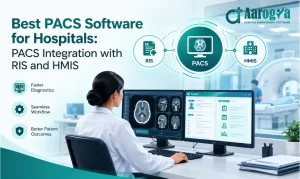
HMIS → RIS → Imaging Modality → PACS → Radiology Report → EMR/HMIS
This does not mean every system has to become one application. Instead, each system can continue performing its intended role while exchanging the information required by the workflow.
IHE Radiology provides integration profiles covering areas such as scheduled workflow, patient information reconciliation, reporting workflow and web-based image access.

9. PACS Viewer and Medical Image Management
A PACS is only useful when authorised users can work effectively with the images it stores.
The PACS viewer is therefore an important part of the overall system.
Radiologists may need tools for viewing and comparing studies, adjusting image presentation, examining different series and reviewing previous examinations.
Clinicians may have different requirements. They may primarily need convenient access to relevant images and reports while reviewing a patient’s clinical record.
The best PACS viewer depends on the hospital’s use case. Diagnostic radiology environments may have more advanced requirements than general clinical viewing.
Web-based access can also become important when images need to be accessed across departments or locations. Modern IHE Radiology profiles include web-based image access and other approaches to distributed imaging workflows.
A hospital should therefore evaluate the viewer separately from the archive. Storage capacity alone does not determine the usability of a PACS system.
10. Cloud PACS vs On-Premise PACS
Hospitals may consider different deployment models when selecting PACS software.
Cloud PACS
A cloud-based PACS can provide access to imaging infrastructure without requiring every component of the archive to be hosted inside the hospital.
It may be attractive for organisations looking for scalability, distributed access and reduced dependence on local infrastructure.
On-Premise PACS
An on-premise PACS keeps the primary infrastructure within the hospital or its controlled data environment.
This can provide greater direct control over infrastructure, networking and data-management policies.
Which is better?
There is no universal answer.
The decision should consider:
- Imaging volume
- Number of locations
- Network connectivity
- Storage requirements
- Security policies
- Data governance
- Disaster recovery
- Budget
- Existing infrastructure
- Remote access requirements
The important question is not simply whether a PACS is cloud or on-premise. It is whether the deployment model can support the hospital’s expected imaging workload reliably.
11. How to Choose the Best PACS Software for a Hospital
Hospitals should evaluate PACS software against their actual workflow rather than selecting a system based only on a feature list.
1. Check DICOM compatibility
Confirm that the PACS can communicate with the hospital’s existing and planned imaging modalities.
2. Evaluate RIS integration
The PACS should work effectively with the hospital’s Radiology Information System and radiology workflows.
3. Look at HMIS/HIS integration
Consider how patient information, orders and reports move between the hospital system and radiology systems.
4. Assess the PACS viewer
The viewer should meet the requirements of radiologists as well as clinicians who need access to images.
5. Review storage and scalability
Imaging volumes can grow significantly over time. Storage architecture should support both current and future requirements.
6. Consider reporting
Radiology reporting should fit naturally into the imaging workflow rather than creating another disconnected process.
7. Evaluate security
Access control, authentication, auditability, backup and disaster recovery should be considered during implementation.
8. Review interoperability
A PACS should not become a closed environment. Hospitals should understand how it connects with existing and future healthcare systems.
9. Consider implementation and support
A technically capable system still requires proper implementation, configuration, training and ongoing support.
10. Plan for future requirements
Hospitals should consider future expansion, additional locations, enterprise imaging, remote access and emerging interoperability requirements.
For a hospital comparing the best PACS software, these criteria provide a more useful evaluation framework than simply comparing the number of features advertised by different vendors.
12. Common PACS Integration Challenges
PACS implementation can involve several technical and operational challenges.
Data Mapping
Different systems may use different fields, identifiers and formats. Patient and study information must be mapped carefully to prevent inconsistencies.
Duplicate Patient Records
Incorrect patient identification can create serious problems in medical imaging. Integration should support consistent patient identity management.
Legacy Systems
Older imaging equipment or hospital applications may require additional interface configuration before they can communicate effectively with newer systems.
Network Performance
Medical images can be large. Network capacity and reliability therefore matter, particularly when multiple modalities or locations use the same PACS infrastructure.
Migration
Hospitals replacing an existing PACS may need to migrate years of historical imaging data.
User Adoption
Radiologists, technicians and clinicians need training on the new workflow. A technically successful implementation can still fail to deliver its expected value if users struggle with the system.
These challenges are not reasons to avoid PACS integration. They are reasons to plan the implementation carefully.

13. Aarogya RIS and PACS Integration
For hospitals looking for a connected radiology workflow, Aarogya RIS provides an integrated approach to registration, radiology orders, billing, diagnostics, PACS and EMR connectivity.
Aarogya’s RIS page describes native connectivity with NEORAD PACS, along with HL7 and DICOM support and bi-directional data exchange.
The system is designed around a single patient identity across relevant workflows. Patient registration, visit mapping and UHID can be carried across RIS, PACS, EMR and billing processes.
The radiology workflow can also connect investigation orders with billing, while patient and investigation information can move forward without repeatedly entering the same information.
At the imaging stage, Aarogya RIS supports the movement of orders toward NEORAD PACS and describes machine-ready workflows for CT and MRI environments.
The reporting side is also connected back to the clinical environment, with Aarogya describing HL7-based report synchronization and access to imaging links through the EMR.
This makes Aarogya relevant for hospitals that are not simply looking for an isolated PACS archive, but are evaluating PACS integration software as part of a broader HMIS and radiology environment.
14. The Future of PACS in Hospitals
PACS continues to move beyond traditional image archiving.
As healthcare organisations expand across locations, imaging increasingly needs to be available across departments and connected to wider clinical systems.
Enterprise imaging is one direction of this evolution. Instead of treating radiology images as a completely separate information category, hospitals can connect imaging with the broader patient record and clinical workflow.
Web-based access, remote reporting, interoperability frameworks and advanced imaging applications are also influencing how PACS environments are designed.
IHE Radiology currently includes profiles for areas such as web-based image access, remote reading workflows, results distribution and AI-related imaging interoperability.
Artificial intelligence is another developing area. Future imaging environments may increasingly combine PACS with AI applications for image analysis, workflow support and clinical decision-making. Research on PACS evolution also identifies integration with AI as an important direction for future imaging systems.
For hospitals, the practical lesson is simple: PACS should be selected with future interoperability in mind.
A system that can connect with the hospital’s existing infrastructure and adapt to changing imaging requirements is more valuable than a system designed only around today’s workflow.

15. Conclusion
The best PACS software for hospitals is not necessarily the system with the longest feature list. It is the system that fits the hospital’s radiology workflow, supports reliable image management and integrates effectively with RIS, HMIS, EMR and imaging equipment.
DICOM, HL7, PACS viewers, storage, reporting, security, scalability and interoperability should all be considered when comparing PACS solutions.
Most importantly, PACS should not operate as an isolated image archive. PACS integration with RIS and HMIS can help create a connected radiology environment where patient information, orders, images and reports move together across the hospital.
For hospitals planning to modernise radiology workflows, Explore Aarogya RIS
provide an integrated approach to hospital and radiology management, including RIS-PACS connectivity, HL7 and DICOM support, patient identity management and clinical report integration.
If your hospital is evaluating the best PACS software, PACS integration or RIS-PACS integration, explore how Aarogya Hospital Management Software can support a connected digital radiology workflow.
Frequently Asked Questions
1. What is PACS in radiology?
2. What is the difference between PACS and RIS?
3. What is PACS integration?
4. Why is DICOM important for PACS?
5. What is RIS-PACS integration?
RIS-PACS integration connects radiology workflow information with medical image management, helping associate patient and examination information with the corresponding imaging studies.
6. What should hospitals look for in the best PACS software?
OPD billing under TPA involves pre-authorization checks for covered outpatient consultations and diagnostics, followed by real-time updates on claims and billing settlements.
7. Can PACS integrate with an HMIS?
8. Does Aarogya support RIS and PACS integration?
Aarogya RIS provides connectivity with NEORAD PACS and describes HL7 and DICOM support, bi-directional data exchange and integration across registration, billing, diagnostics, PACS and EMR workflows.Learn More About Aarogya RIS
Categories
Recent Posts
-
 03 Nov 2026What is NHCX, Full Form of NHCX Integration and Benefits for Hospitals
-
31 Oct 2026Best PACS Software for Hospitals: PACS Integration with RIS and HMIS
-
13 Oct 2026TPA Claim Approvals Made Easy with Hospital Billing Software
-
28 Sep 2026What is NABH? Full Form, Accreditation, Certification & NABH-Certified HMS Explained
-
08 Sep 2026EMR Software: What It Is, How It Works, Key Benefits, Features, and the Future of Digital Healthcare
-
16 Aug 2026What Is a Kiosk Machine? Smart Kiosks in Healthcare | Aarogya
-
27 Jul 2026Patient Drug Registry, Unified Health Interface (UHI) & NHCX FHIR: How Aarogya HMIS Can Power India's Next Generation Digital Healthcare
-
29 Jun 2026Best HMIS Software in Kolkata 2026: How Digital Healthcare Is Transforming Patient Care Across the City
-
25 Jun 2026Best Bank Reconciliation Software | Automated Bank Reconciliation with Aarogya
-
04 Jun 2026Best Hospital Management Software(HMIS) in Kanpur 2026: Complete Guide to Modern HMIS Solutions